
Quick comparison
Using Max for every request isn’t necessary. Choosing the right model for the task helps you use your AIWA credits more efficiently.
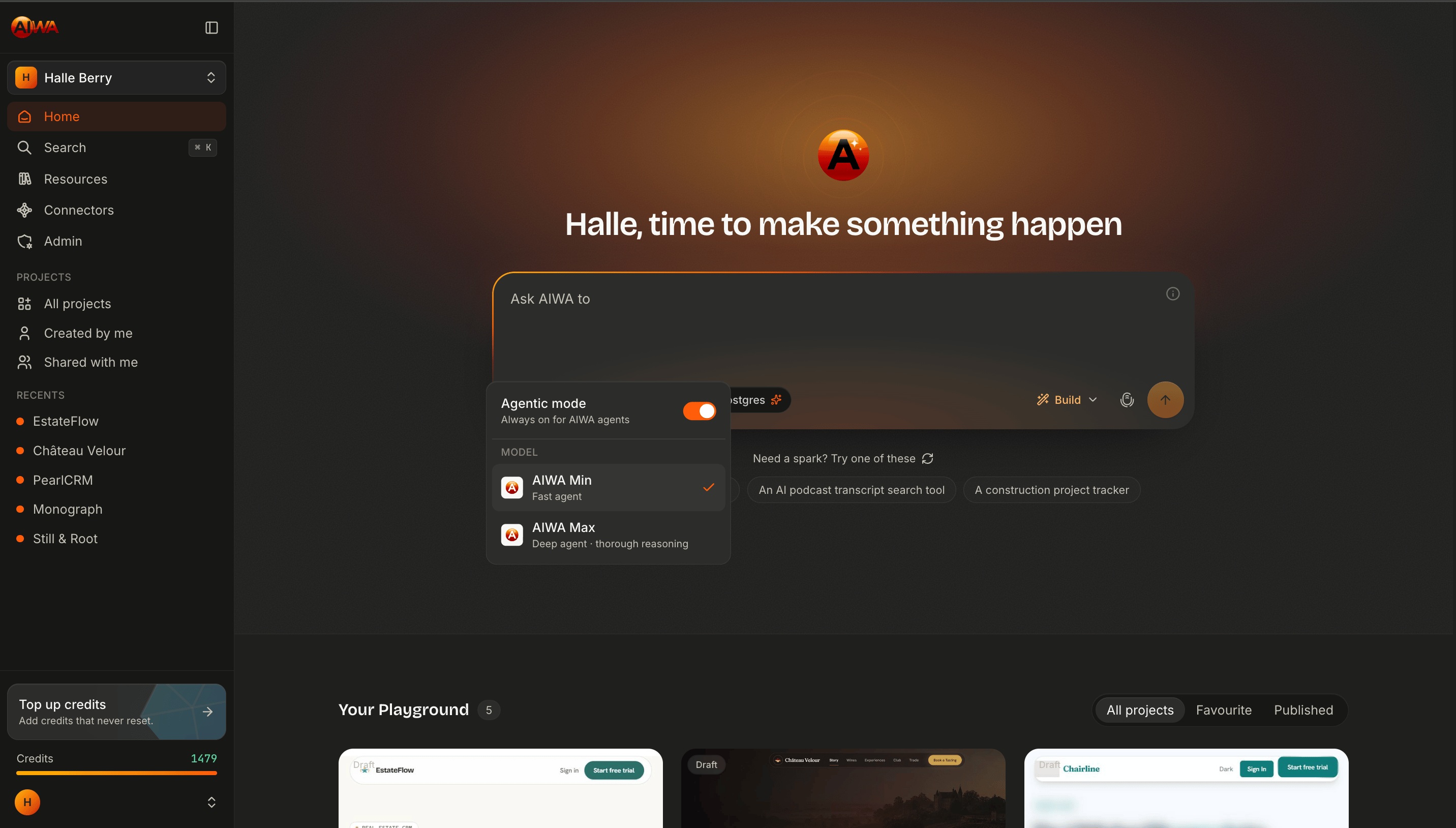
AIWA Min
AIWA Min is optimized for fast, focused development work. Use Min when your request is relatively straightforward and doesn’t require extensive reasoning across many parts of your application. Examples include:Change the hero headline to “Build Better. Build Faster.”
Add another item to the FAQ.
Make these cards display in two columns on tablets.
Add a phone number field to the contact form.
Change the primary button color to match our brand.For these kinds of requests, deeper reasoning usually isn’t necessary. Min can understand the instruction and execute it efficiently.
When to use AIWA Min
Min is a good choice for:- Copy changes
- Small design adjustments
- Adding simple sections
- Updating existing components
- Straightforward page creation
- Responsive layout changes
- Simple forms
- Minor feature modifications
- Focused fixes
- Routine iteration
AIWA Max
AIWA Max is designed for work that benefits from deeper reasoning and broader understanding of your application. Some product changes aren’t isolated. They affect several systems at once and require AIWA to reason about how those systems interact. For example:Convert this application into a multi-tenant SaaS. Companies should have separate workspaces, invite team members, assign roles and permissions, switch between workspaces, and maintain complete data isolation.That request potentially affects:
- Authentication
- Authorization
- Database structure
- APIs
- Application state
- Navigation
- Existing features
- Security
- User experience
When to use AIWA Max
Consider Max for:- Complex SaaS applications
- Major new features
- Architecture decisions
- Database-heavy functionality
- Authentication and authorization
- Multi-user systems
- Complex integrations
- Major application restructuring
- Difficult debugging
- Features spanning many parts of your application
- Complex Plan Mode sessions
A practical example
Imagine you’re building a CRM. You want to change the dashboard headline.Change “Welcome back” to “Good morning, Sarah.”Use Min. Then you want to add another filter to the leads page.
Add a lead source filter with Website, Referral, Facebook, Google, and Other.Use Min. Then you decide to introduce teams.
Add multi-tenant workspaces where companies can invite agents, assign roles, and keep all CRM data isolated between organizations.Use Max. Later, a button needs repositioning.
Move the Create Lead button beside the search bar on desktop.Switch back to Min. You don’t need to stay on one model for the entire project.
Match intelligence to the task
A useful way to think about Min and Max is to consider the reasoning surface of your request. Small reasoning surface The change affects one clear part of the application.Increase the spacing between these cards.Min. Medium reasoning surface The change affects several related components but the desired behavior is clear.
Add filtering and pagination to the customer list.Min will often be sufficient. Large reasoning surface The change affects several systems and requires architectural decisions.
Add organization-level roles and permissions throughout the application.Max. The more dependencies AIWA needs to reason about, the more useful Max becomes.
Min doesn’t mean low quality
It’s important to understand that Min isn’t simply a worse version of Max. Min is optimized for a different kind of work. Using deep reasoning to change a headline or add a simple button would often be unnecessary. The goal is to use the appropriate level of intelligence for the problem you’re solving. Think of it like choosing the right member of a product team for the task. You wouldn’t need an architecture review to change a sentence on a landing page.Max doesn’t replace a good prompt
Using Max doesn’t mean your instructions can be unclear. Compare:Improve my SaaS.with:
Review the onboarding flow for this SaaS application. New users currently sign up and immediately reach an empty dashboard. Improve the onboarding experience so they understand what to do next and can reach their first successful outcome quickly.The second request gives Max a much clearer problem to reason about. Good context plus appropriate intelligence usually produces better results.
Using Min and Max with AIWA modes
Your model choice and your mode solve different problems. Mode tells AIWA how to approach the request. Min or Max determines how much reasoning to apply. For example: Build + MinAdd another pricing tier to this page.Straightforward implementation. Build + Max
Implement the approved multi-tenant workspace architecture across the existing application.Complex implementation. Plan + Min
Plan a simple testimonials feature for the homepage.Possible, although probably unnecessary. Plan + Max
Plan how to add marketplace functionality with buyers, sellers, listings, orders, payments, commissions, and disputes to the existing SaaS.This requires much deeper product and technical reasoning.
Max is especially useful with Plan Mode
For significant features, Plan + Max can be a powerful combination. For example:Analyze the existing application and create a plan for introducing subscription billing with Free, Pro, and Business tiers. Cover Stripe integration, feature entitlements, upgrades, downgrades, cancellations, webhooks, billing portal access, database changes, and failure scenarios.Max can reason through the dependencies before anything is implemented. Once the plan is approved, you can move into Build Mode for implementation.
Use your credits intentionally
More reasoning requires more computation, so Min and Max may consume credits differently. That doesn’t mean you should avoid Max. It means you should use it where the additional reasoning creates value. A good default strategy is:1
Start with Min
Use Min for normal development and focused changes.
2
Recognize complexity
If the request involves several systems, dependencies, or important product decisions, consider Max.
3
Use Max where it matters
Use deeper reasoning for architecture, complex planning, difficult features, and challenging debugging.
4
Return to Min
Once you’re back to straightforward iteration, switch to Min again.
Which one should I choose?
If you’re unsure, ask yourself: Is AIWA mostly executing my instruction, or does it need to figure out a complex problem? If it’s mostly executing: → AIWA Min If it needs substantial reasoning: → AIWA Max A simple rule to remember: Min for execution. Max for complexity. You can switch between them throughout the life of your project.Next: Project Memory
AIWA doesn’t only respond to the prompt in front of it. As your application grows, maintaining context about the product becomes increasingly important.Project Memory
See how AIWA remembers context about your product as it grows.